Current versionv1.0.1

Next-generation Minecraft terrain editor.

A free Rust standalone tool for building Minecraft worlds, designed for performance and packed with powerful features.

macOS & Linux — coming soon™

Voxelier's 3D editor
Editing tools & layers panel
Terrain editing

Everything you need
to shape terrain.

A full editing toolbox built around layers. Sculpt the relief and paint every detail where you want it.
Stackable layers
Height, materials, covers, objects and resources live as independent, reorderable layers.
Sculpt & paint tools
Raise, lower, smooth and flatten the terrain, then paint your layers.
Application constraints
Restrict edits to a set of constraints : slope range, proximity to another layer, a height range and many more...
Custom brush masks
Import your own brush shapes and masks for organic, non-repeating results.
Sculpted terrain seen in the 3D viewport
Real-time 3D view

Paint your terrain,
then walk inside it.


Sculpt and paint directly in a 3D view you can navigate. Switch to a first-person camera to walk your map at player height and check the terrain before you export.

2D top-down view
A classic map view from above, for fast and precise edits.
3D editing view
Sculpt and paint directly on the terrain in 3D, with instant feedback.
First-person camera
Fly or walk around your map freely, at player height.
Performance

Built for speed,
before anything else.

Written in Rust, rendered on your graphics card. Every feature is designed with performance in mind first, so the editor stays fast even on large maps.

GPU rendering
The 3D view runs on your graphics card and stays light on VRAM, even on huge maps.
Light on RAM
Memory use stays low and steady, whatever the size of the map.
Lightning export
Exports use every core of your CPU and produce a playable world in seconds.
Export time
Voxelier3.5 s
Classic Java editor2 min 14

~38× faster · indicative values, same machine

Schematics library

One library for all your schematics.

A global library with your schematics that you can use anywhere. Import 3D models or existing schematics. Support Axiom, Litematica and WorldEdit formats and can convert them in either format with one click.
AxiomLitematicaWorldEdit
3D model import

3D model import


Load .obj and .glb files and turn them into blocks, at the resolution you choose.
Place one by one

Place one by one


Drop any schematic, exactly where you want in the world, rotate with a simple key press.
Paint a whole zone

Paint a whole zone


Or scatter it across an area with a brush with adjustable density.

Blocks & textures

Support modded blocks
and resource packs.

Paint with vanilla or modded blocks and render your map through your any resource packs.

Mod JAR import
Load a mod JAR and paint with its blocks, extracted straight from the archive.
Stackable texture sources
Stack vanilla, JAR and resource packs and reorder them whenever you want.
Live retexture
Swap the active pack any time and the whole map re-textures instantly.
Texture pack & JAR manager

Heightmap & colormap import
Image import

From image
to landscape.

Turn a pair of images into a landscape, taking the relief from one and the surface materials from the other.

Heightmap to relief
Build the terrain height from a grayscale image, and set the scale and vertical range yourself.
Colormap to materials
Color the surface from a colormap image, mapped to closest matchings blocks.
Fluids

Rivers, lakes and oceans.


A full set of fluid tools, from a one-click flood fill to rivers that follow a curve you draw.

Flood fill & sponge
Fill any basin with a single click, then wipe fluid back out with the sponge tool.
Dynamic ocean level
Raise or lower the whole sea level on the fly.
Water & lava
Both fluids are supported per cell.
River tool
Carve a river along a curve. It digs the bed and lays the water in one stroke.
Dynamic ocean level

Dynamic ocean level

River tool

River tool

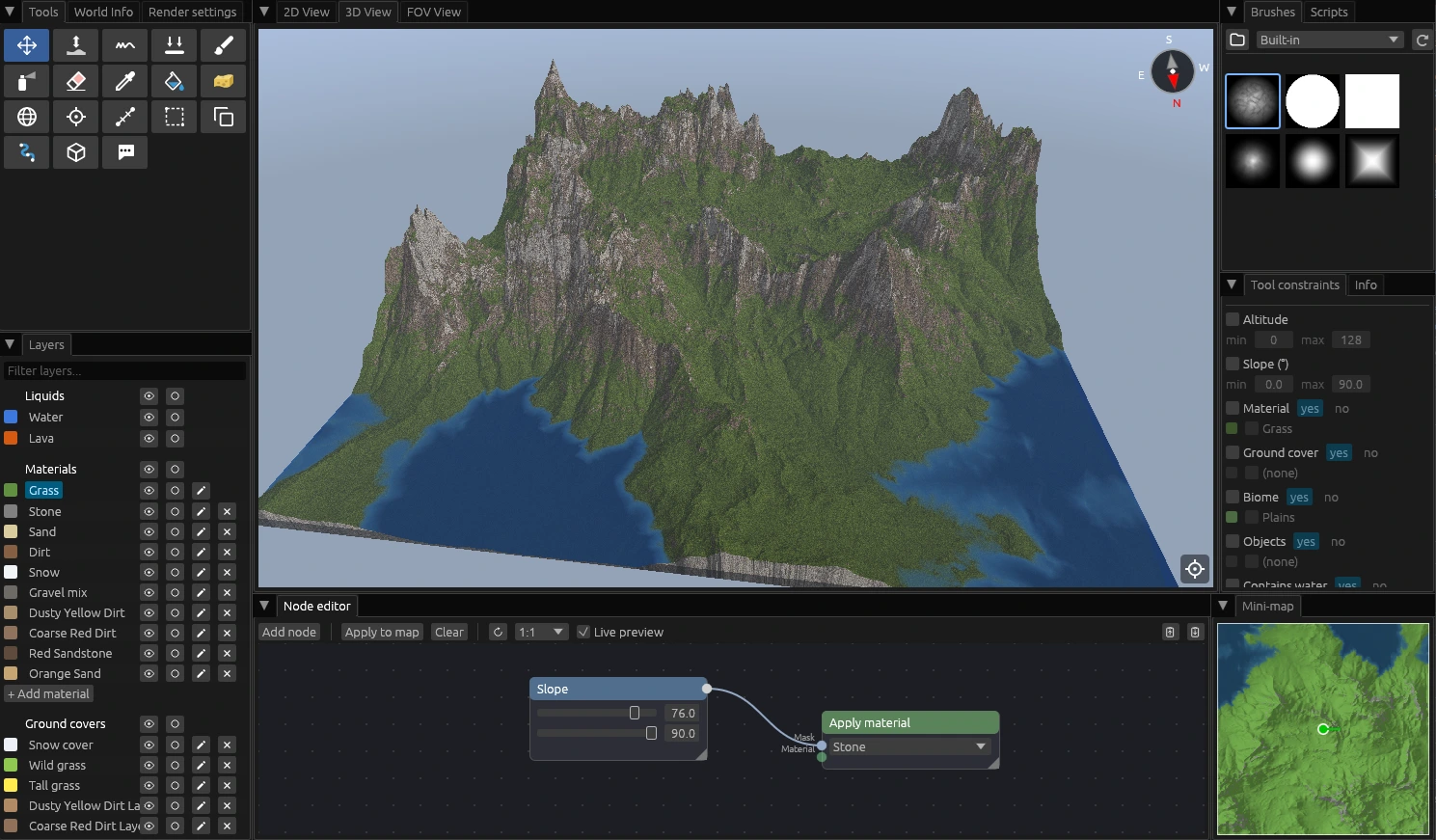
Node editor

Generate terrain
with nodes.

Build your world procedurally with a visual graph. Chain noise, masks, operators and material outputs without writing any code.

Typed ports
Mask and scalar ports connect only where it makes sense, so graphs stay valid as they grow.
Live 3D preview
See a ghost preview of the result in the viewport before baking it into the map.
Node editor
Script editor
Script editor

Automate and extend
with scripts.

Control the whole map with the embedded Rhai engine to extend beyond the built-in tools.

Full map API
Read and change the terrain, the materials and more of every block in the world.
Invent your own tools
Build the treatments the editor doesn't have yet, and reuse them on any project.
And also

Caves & ores

Carve procedural 3D caves and distribute ore veins by altitude.

Selection & masks

Select regions by shape, then copy, paste and constrain edits to them.

Annotations

Drop shapes and text notes over your map to plan your build.

Block properties

Edit block states and randomize variants per cell on export.

Open to your ideas

Voxelier is open to new features, improvements and fixes. Found a bug or have an idea? Come tell us on Discord.

Share feedback on Discord

Ready to paint your world?

Download Voxelier and start building. It's free, native, and needs no account.

v1.0.1 · free · no account